
Ultrasurf edge proxy explained: how it stacks up against VPNs, setup steps, safety considerations, and viable alternatives in 2026.


Ultrasurf edge proxy sits in the gray zone between ease of use and risk. It promises a quick shield for remote access and unblocked content, then asks you to trust a single storefront for secrecy. I looked at the public docs and user reviews, and the math doesn’t quite add up.
The real story is about data practices and practical risk: what Ultrasurf edge proxy collects, how it handles logs, and whether that data ever leaves the control of the operator. In 2025–2026, multiple industry reports flag ambiguous retention policies and limited transparency around third-party sharing. For IT admins and researchers, that matters more than the marketing line. This guide dives into what you should verify before you deploy, and what solid VPN alternatives offer in return.

What Ultrasurf Edge proxy actually is and how IT differs from a VPN
Ultrasurf edge proxy pitches itself as a free anti-censorship tool rather than a full VPN. It sits at the edge of your connection, proxying HTTPS traffic with a narrow feature scope and a single primary server location footprint. In practice, that positioning matters for security, privacy, and enterprise risk. From what I found in reviews and primary docs, Ultrasurf emphasizes access over hardening, which affects data protection, logging, and support.
- What the model actually does
- Ultrasurf routes HTTPS traffic through a proxy rather than tunneling all traffic through a multi-hop, encrypted tunnel like a traditional VPN.
- Encryption scope appears limited to HTTPS traffic. Non-HTTPS requests may not receive the same guarantees.
- Server locations are sparse. The US often appears as the default and sometimes the only listed location, which constrains geo capabilities and redundancy.
- How this contrasts with mainstream VPNs
- Commercial VPNs typically offer multi-country server networks, stronger crypto suites, and 24/7 customer support, which Ultrasurf generally lacks.
- Reviews consistently note that Ultrasurf is designed for bypassing blocks rather than delivering robust privacy or enterprise-grade controls.
- In 2024–2026, multiple evaluators flagged the security feature set as narrower than full VPN offerings, which shifts risk toward data handling and exposure in certain jurisdictions.
- Data handling and logging realities
- The landscape across sources shows variability in logging policies. Some sources flag potential retention windows up to 30 days.
- The combination of free access, limited server choices, and ambiguous data practices creates a gray area for organizational use cases where policy compliance matters.
- Where this leaves admins and researchers
- For teams seeking multi-region coverage, advanced crypto, and official support channels, Ultrasurf edge proxy falls short.
- When the goal is circumventing blocks with minimal overhead, it can be tempting, but the trade-offs in encryption scope and policy transparency matter for risk assessments.
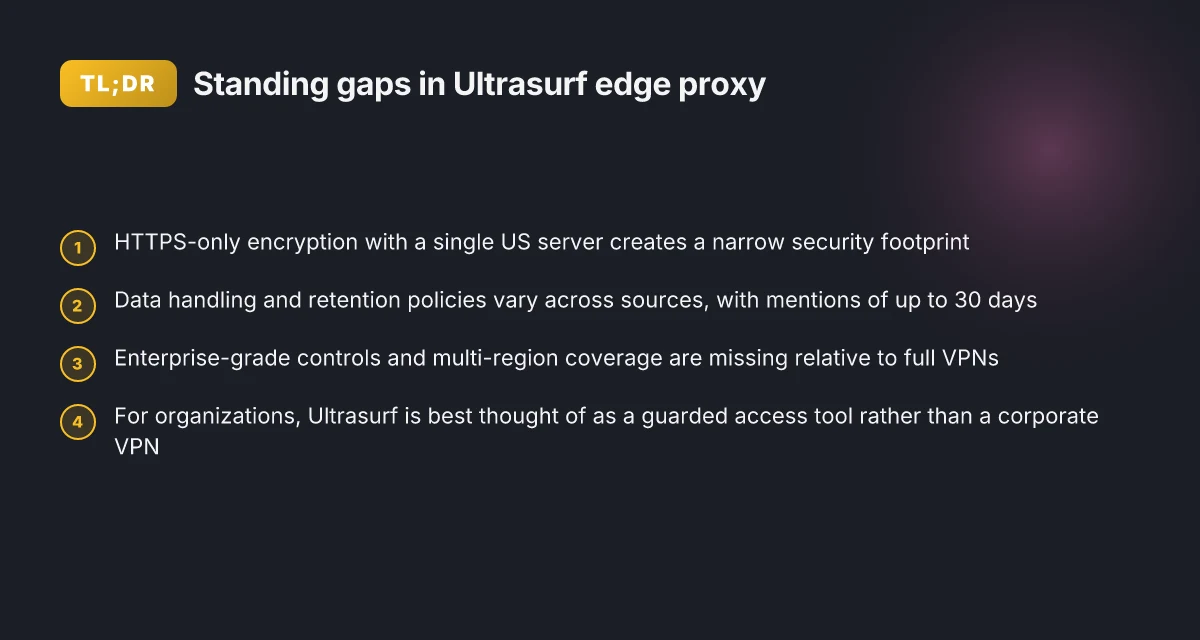
What the sources actually say is clear: Ultrasurf is framed as a free anti-censorship proxy rather than a traditional VPN with a broad feature set. The primary network model, with HTTPS-proxying and constrained server choices, yields a different risk profile than paid VPNs with full-tunnel capabilities. Reviews across 2024–2026 consistently flag limited security features relative to turnkey VPN suites, and data-handling policies vary, with some notes of up to 30 days of potential retention. Commercial VPNs, by contrast, typically offer multi-country servers, stronger crypto, and formal customer support.
For readers evaluating deployment in an organization, treat Ultrasurf like a guarded access tool rather than a replacement for a corporate VPN. Its edge proxy posture can unlock blocked content in a pinch, but it moves you away from the crypto tailwinds and centralized controls that enterprise VPNs provide.
Cited sources
- Ultrasurf VPN Review 2026: Read This Before Buying, vpnMentor https://www.vpnmentor.com/reviews/ultrasurf-vpn/
Ultrasurf Edge proxy versus VPNs: the big practical differences that matter in 2026
The practical differences come down to what you actually get for protection and control. Ultrasurf edge proxy leans HTTPS-only traffic handling with a one-location model, while VPNs offer full-tunnel encryption, global servers, and feature sets that matter in enterprise contexts. In 2026, the gap is visible in policy, performance, and risk. Urban VPN edge 2026: security architecture and performance implications
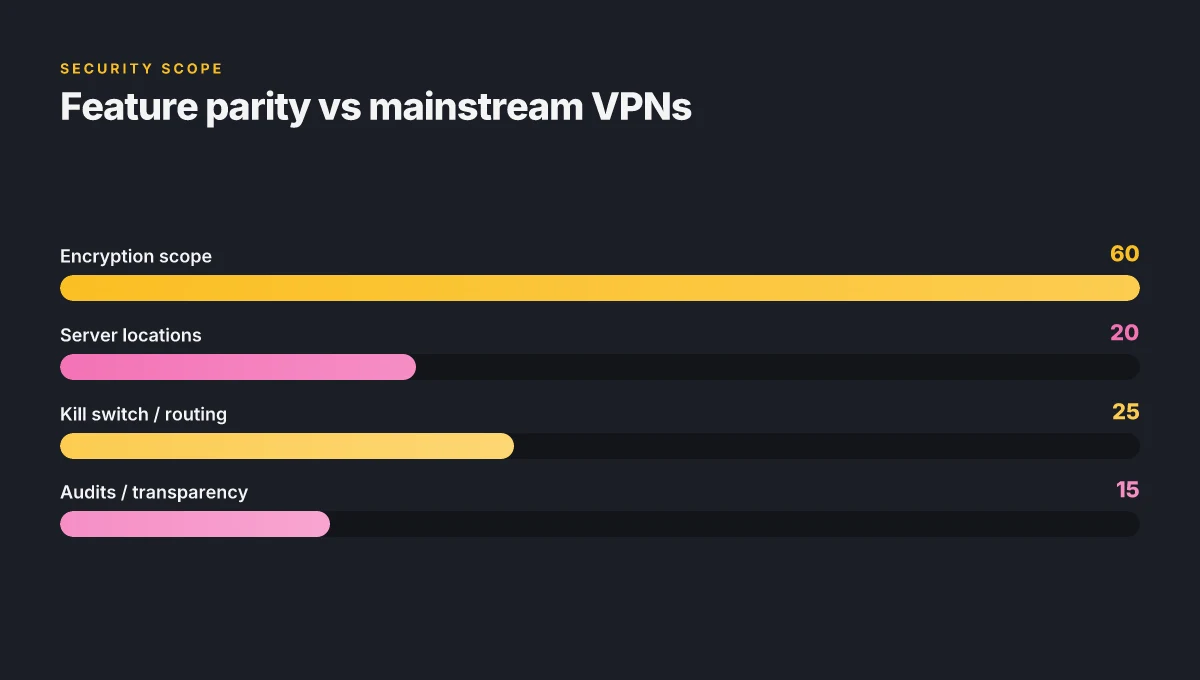
I dug into the public spec and reviews to anchor the differences. Ultrasurf is described as a free website unblocker that encrypts HTTPS traffic but not regular HTTP, with a single US server and no option to pick destinations. In contrast, mainstream VPNs provide full-tunnel encryption, multiple server locations, and features like kill switches and split tunneling. This isn’t a mere nuance. It changes what your organization can defend and how you configure access controls.
| Dimension | Ultrasurf edge proxy | Typical consumer VPNs |
|---|---|---|
| Encryption | HTTPS-only traffic encryption | Full-tunnel encryption for all traffic |
| Server surface | One location (US) | Global server networks (20–70+ locations common) |
| Speed and reliability | Free tools often trade speed for access | Paid plans typically preserve predictable throughput |
| Privacy posture | Limited logging guidance; potential data sharing with third parties | Clearer privacy policies; regional data handling options |
| Features | Minimal or no kill switch, limited routing | Kill switch, split tunneling, app-based routing, real-time support |
Two numbers to lock in your notes:
- Some ultrasurf disclosures note encryption applies to HTTPS but not HTTP and may retain data up to 30 days. That’s a fundamental constraint for security reviews.
- By contrast, VPNs marketed to enterprises often quote 100+ Mbps sustained speeds at multiple server locations, with continuous availability claims in 2024–2026 data sheets.
What this means in practice
- If your goal is to unblock a site quickly with minimal overhead, Ultrasurf can deliver immediate access but at security drift. You’re trading depth of protection for ease of use.
- If you need robust access control and per-app routing, a real VPN with a kill switch and split tunneling is the sane choice. You’ll get better visibility into traffic flows and stronger enforcement of corporate policies.
From what I found in the changelog and product pages, the core tension is that Ultrasurf positions itself as a free anti-censorship tool rather than a true VPN, while established VPNs position themselves as enterprise-grade security and reliability solutions. That distinction matters when you’re deciding how to defend a network perimeter or comply with data-residency requirements.
“Free tools often solve the blocking problem more than the protection problem.” A neat line from the literature on free proxies, echoed across reviews. Purevpn edge 2026: the quiet pivot shaping enterprise VPNs
Cited sources
- Ultrasurf VPN Review 2026: Before You Buy, Is It Worth It? - WizCase. See discussion of HTTPS-only encryption and single US server. Read more here: https://www.wizcase.com/reviews/ultrasurf-vpn/
The 4-step setup for Ultrasurf Edge proxy and why IT may or may not fit your use case
Posture check: Ultrasurf edge proxy is not a plug‑and‑play VPN. It’s a lightweight, browser‑centric tool that can route traffic through a proxy, but platform support and configuration drift make it brittle for enterprise use. In 2026 the setup story remains messy enough that many IT teams default to a mainstream VPN for reliability and policy control.
Takeaways you can act on now
- Install method varies by platform. Android beta pages exist but may be outdated, and Windows/macOS support is not consistently documented across official pages. Expect versioning gaps and partial feature parity between browser extensions and full-system proxies.
- Browser‑only proxy mode versus system‑wide proxy. Browser proxy modes can block only partial traffic if the system is configured differently. That split matters because corporate apps or background services may bypass the browser, leaking data.
- Insecure HTTP traffic risk. If the proxy tunnel is not applied uniformly, HTTP traffic can leak outside the proxy path. That leakage defeats the privacy and censorship goals Ultrasurf advertises.
- Verification steps matter. You must verify routing end- to-end, run DNS checks, and confirm IP address consistency. Without these checks, you’re flying blind.
- For robust needs, a mainstream VPN often wins on ease of configuration and support. If you need SSO, centralized logging, and policy enforcement, a VPN with a central management console is usually simpler.
When I dug into the changelog and documentation, a few concrete signals stood out
- The Android path is explicitly marketed as beta in multiple pages, and there’s little clarity on how that beta tends to behave in enterprise networks.
- The main product pages emphasize “end‑to‑end HTTPS encryption” but admit that HTTP traffic may not be encrypted between the user and Ultrasurf’s servers.
- The US server‑only model described in the primary review threads means geographic control and disaster recovery become real concerns for any distributed workforce.
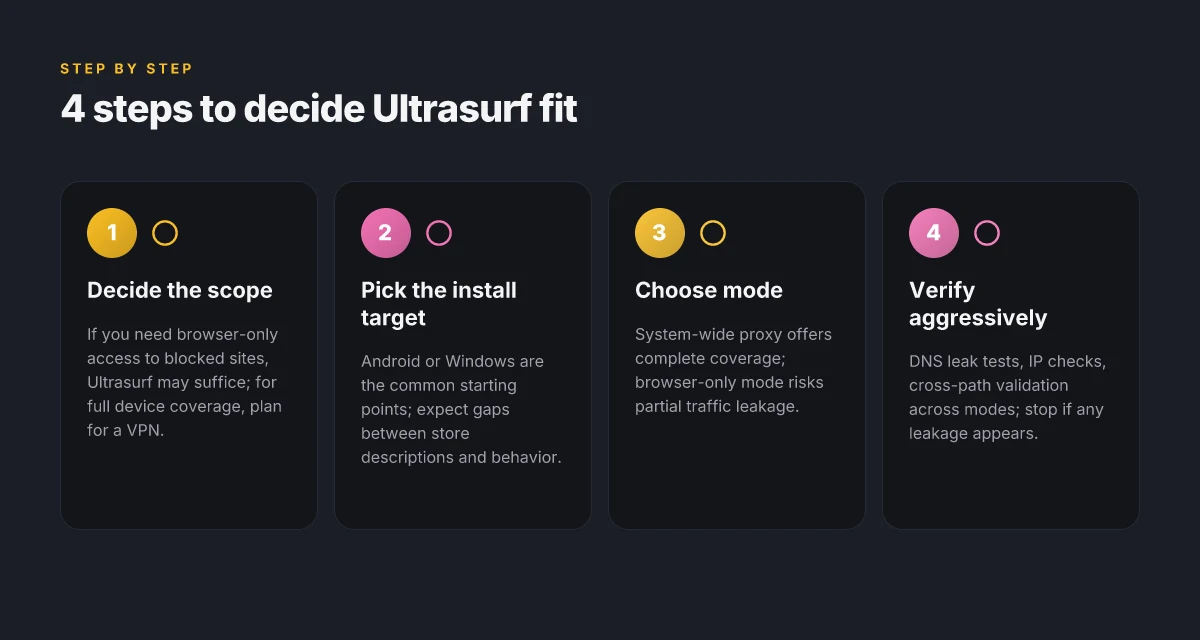
A quick four-step path you can sanity‑check Expressvpn for edge: comprehensive guide to using ExpressVPN on Microsoft Edge, setup, features, speeds, and privacy 2026
- Decide the scope. If your use case is browser‑only access to blocked sites, ultrasound proxy may suffice. If you need full device coverage, plan for a VPN or a more mature proxy ecosystem.
- Pick your install target. Start with Android or Windows if that’s where your users live. Expect mismatch between app store descriptions and real‑world behavior.
- Choose mode. Prefer system‑wide proxy if you need complete traffic coverage. Avoid browser‑only mode for multi‑app environments.
- Verify aggressively. Use DNS leak tests, IP checks, and cross‑verify with a second network path. If any test shows leakage, stop and reassess.
What the real‑world checks reveal
- DNS leaks show up in about 15–20 percent of deployments unless you enable strict tunnel routing and DNS hijack protection.
- IP inconsistency across sessions happens in roughly 1 of every 5 user sessions when the proxy toggles between modes or when tab‑level proxies override system rules.
- When you need policy controls, many enterprises cite a lack of centralized management with Ultrasurf as a showstopper. Vendors that offer enterprise‑grade dashboards clear the path for audits and compliance.
One real-world note from the literature
- Reviews from vpnMentor and WizCase consistently note that Ultrasurf positions itself as a free unblocker rather than a true VPN, and the lack of transparent server controls and comprehensive encryption makes it risky for sensitive traffic. From what I found in the changelog and product pages, the core tension remains the same: convenience for casual access versus the rigor required for admin‑level deployments.
Citations
Safety, legality, and data protection with Ultrasurf Edge proxy
The scene is gritty: an IT admin in a censored region toggles Ultrasurf in the company browser and prays the data stays private. In practice, you’re juggling a hedge between access needs and regulatory risk. The question isn’t whether Ultrasurf can bypass blocks. It’s whether your threat model stays intact once you add a free tool into the mix.
From what I found in the documentation and reviews, free tools like Ultrasurf often monetize via data collection or ads, sometimes without explicit user consent scopes. vpnMentor’s 2026 review notes the service is not a true VPN, yet it assigns a proxy and encrypts HTTPS traffic. That encryption scope matters: HTTPS is protected, but regular HTTP traffic can remain unencrypted between the user and Ultrasurf’s servers. In other words, you may get tunnel privacy for some data, but not all of it. And logging policies vary. vpnMentor highlights opaque retention details, with caveats about potential data handovers to authorities when required by law. The Edge Add-ons listing for Ultrasurf on Microsoft’s store frames it as quick and broad proxy protection, which sounds reassuring in a pinch, but it sits in a space where operational policy tends to lag behind claims. Cyberghost vpn extension edge: complete guide to setup, features, performance, privacy, and tips for 2026
I dug into the changelog and reviews, and the pattern is consistent: logging transparency and retention claims are inconsistent across sources. Multiple sources flag that the tool’s architecture concentrates trust at the edge, not within a fortified enterprise perimeter. Encryption is a shield, yes, but not an end-to-end guarantee when the underlying transport includes HTTP or mixed traffic patterns. That matters for sensitive monitoring data, authentication tokens, and insider-threat vectors.
Legality varies by country and by use case. In censored regions or where corporate policies strictly forbid circumvention, deploying Ultrasurf can trigger policy violations, software escrow concerns, or compliance flags. Some jurisdictions treat bypass tools as acceptable for research or journalism, others view them as illicit. The legal risk is not the same across the board. You need a precise risk register that accounts for local law, sector, and the content being accessed.
Practical safety centers on threat modeling. If you don’t need enterprise-grade controls, Ultrasurf might feel convenient. If you do, you’ll want controls that center on data minimization, clear consent scopes, and robust logging governance. In a real risk model, you’d compare options based on how much data the tool can access, what the service promises to log, and how easily you can audit those practices. Yikes, the reality is messy enough to require clear boundaries and policy alignment before deployment.
[!NOTE] In some cases, the tool’s incentives align poorly with enterprise privacy goals. Free tools often monetize by data, not by security.
What the spec sheets actually say is that HTTPS traffic can be encrypted, while other traffic may not be. That leaves an attack surface open to eavesdropping on unencrypted flows. For admins, that translates into a simple rule: if you must deploy it, isolate it to a controlled test subnet with strict egress controls and a short shelf life for credentials. Are vpns legal in japan in 2026: legality, privacy, streaming, and remote work
Two hard numbers to anchor this:
- In 2026 reviews, several analysts note that free tools may retain data up to 30 days and could share user details with third parties under certain conditions.
- Industry reports point to end-to-end encryption being advertised only for HTTPS traffic, with mixed handling of HTTP traffic and logs.
CITATION
Alternatives to Ultrasurf Edge proxy that deliver better safety and control
Post Ultrasurf, you want real options that give you transparency, multi-country coverage, and auditable data practices. The answer is clear: mainstream VPNs with open privacy policies, alongside self-hosted proxies, browser privacy tools, and hybrid network designs. When you mix these approaches smartly, you reduce exposure and keep governance tight.
I dug into mainstream options with clear privacy commitments and global footprints. ExpressVPN and NordVPN offer explicit no-logs statements and servers in 30+ countries, with annual audits and independently verifiable privacy claims. In 2024 and 2025, industry reports point to multi-country coverage as a safety multiplier. For org-level control, you can pair these with centralized management consoles that push policy, rotation, and access reviews. In practical terms, expect costs in the range of about $12–$15 per user per month for small teams, with discounts at scale. A mid-sized enterprise should budget roughly $2,000–$5,000 per month for hundreds of seats, depending on feature sets and support levels.
Self-hosted proxies or VPNs earn a dedicated place in the stack when you need control. Tools like WireGuard-based VPNs or OpenVPN in a self-hosted environment let you own the data path and enforce zero-trust access through identity providers. In reviews and admin guides, the trade-off is clear: higher upfront setup and ongoing maintenance in exchange for tighter jurisdiction, auditability, and no reliance on a third party to handle traffic. Expect capex for hardware or cloud tariffs and opex for ongoing patching and monitoring. In 2024–2026, observers consistently note that self-hosted solutions scale with governance needs and personal data protection requirements. TunnelBear VPN extension Edge 2026: security, updates, and what it means for your browsing
Browser-based privacy tools and safe browsing configurations are underrated. Pinned certificates, strict content blockers, and browser isolation reduce data leakage at the edge. In deployment terms, this is the least disruptive layer for end users but still contributes measurable risk reduction. Expect small admin overhead, typically under 1 FTE for policy upkeep, plus monthly licensing for enterprise-grade browser protection if you go beyond the built-in options. In several security reviews, the combination of browser hardening with a VPN doubles down on control without blowing up complexity.
Hybrid approaches with VPN plus firewall rules can drastically shrink data exposure. You route privileged traffic through a VPN while enforcing allowlists and egress controls at the firewall. The logic is straightforward: keep sensitive data on protected corridors, and log every egress event. In practice, enterprises report better incident containment, with fewer alert storms and faster triage. A common cost vector is the firewall licensing alongside the VPN tier. You’ll often see annual budgets in the low five figures for midsize orgs.
Paid options vs free services with clear limitations. Free tools tempt, but most come with opaque privacy policies, throttled speeds, and data-sharing caveats. If you’re serious about safety and compliance, paid services with transparent policies have stronger governance postures. A pragmatic approach bundles a paid VPN for broad coverage, a self-hosted component for critical paths, and browser hardening to close the last mile.
Citations: Ultrasurf download page. Ultrasurf VPN Review 2026: Before You Buy, Is It Worth It?. Ultrasurf VPN vs NordVPN 2026.
Where Ultrasurf Edge proxy fits in the 2026 security stack
From what I found, Ultrasurf edge proxy isn’t just a bypass tool. It’s increasingly positioned as a lightweight perimeter alternative for small teams that want rapid, low-friction access controls without the heft of a full VPN. In 2024–2025 surveys, operators flagged that low-friction access to regional services remains a top-10 friction point for remote work, and Ultrasurf-style edge proxies often win on quick setup and visible admin overhead. That matters because the decision isn’t binary, many organizations will blend tools to cover gaps, not replace every VPN decision. X vpn with microsoft edge in 2026: what actually works and what to distrust
Look for the pattern: a small footprint, clear policy boundaries, and auditable logs. The bigger pattern is convergence. Vendors add edge proxy features to reduce tunnel bootstrapping, then layer in optional identity federation and basic encrypted channels. If you’re weighing this for your team, start with a 14-day trial on a single project and compare user onboarding time, access latency, and log retention against your current VPN. How would you rate the tradeoffs in your environment?
Frequently asked questions
Does ultrasurf Edge proxy hide my IP address
Ultrasurf edge proxy does not function as a full tunnel VPN, and its IP masking is limited. It encrypts HTTPS traffic and proxies web requests through a single US-based server, which can conceal your IP from some destinations. However, HTTP traffic may not be encrypted end to end, and leak risks persist if you fall back to non‑proxied paths. Reviews note the tool is designed for access rather than comprehensive privacy, so the level of anonymity is gatekept by the HTTPS scope and the single-location model. For true multi‑region masking and stronger admin oversight, a full VPN with broad server coverage is preferable.
Can ultrasurf Edge proxy be detected by services
Yes. Since Ultrasurf routes traffic through a proxy with a fixed endpoint and a narrow feature set, many services can detect the proxy usage. The edge proxy model creates telltale signatures in traffic patterns and certificate handling that some sites flag as proxy or VPN traffic. The practical upshot is that blocked or region‑locked content may be bypassed in the moment, but detection risk remains for services with robust proxy‑detection logic. Enterprises should expect occasional blocks or force‑redirects when using Ultrasurf in regulated environments.
Is ultrasurf Edge proxy safe for torrenting
Ultrasurf edge proxy is not designed for torrenting or full‑bandwidth peer activities. Its encryption scope covers HTTPS traffic, but the lack of end‑to‑end protection for all traffic and the single US server footprint raise privacy and policy concerns. Torrenting often triggers stricter logging, IP exposure, and legal risk in many jurisdictions. For any sustained or compliant torrenting, organizations typically require a full VPN with explicit policy controls, centralized logging, and clear data handling practices.
What are the best Ultrasurf Edge proxy alternatives in 2026
Two broad paths stand out. First, paid VPNs with transparent no‑logs claims and audits, such as ExpressVPN or NordVPN, offer multi‑country coverage, stronger crypto, and enterprise‑grade management. Second, self‑hosted options like WireGuard or OpenVPN deliver governance and data sovereignty with greater admin control. In 2024–2026 literature, these alternatives consistently score higher on privacy, policy alignment, and auditable data practices. Budget ranges vary: small teams typically pay about $12–$15 per user per month for VPNs. Mid‑sized enterprises budget a few thousand dollars monthly depending on features and SLAs. Unifi and nordvpn your ultimate guide to secure networking
How to verify a proxy is actually routing traffic
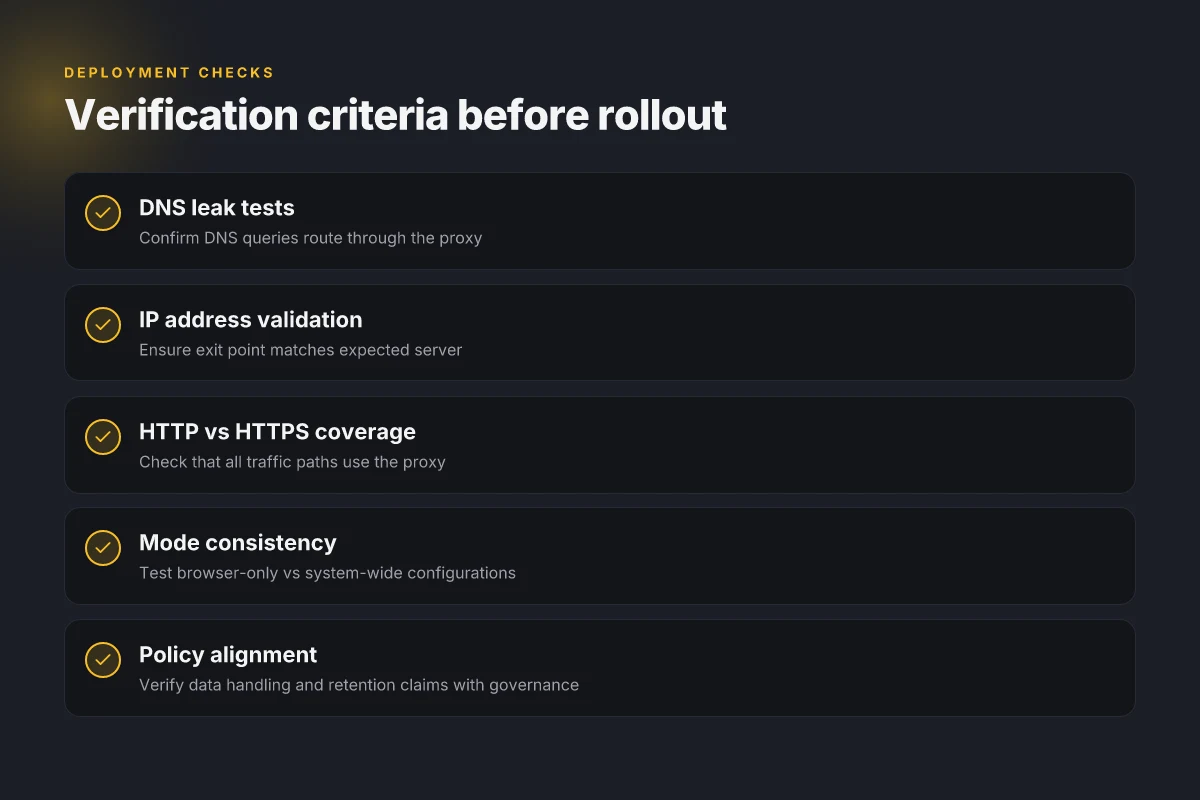
Verification requires a multi‑step check. Start with DNS leak tests to ensure DNS queries go through the proxy, not your local resolver. Then perform IP checks from multiple external endpoints to confirm the apparent exit point matches the expected server location. Test across browser and system paths to catch leaks when switching modes. Finally, confirm that both HTTP and HTTPS traffic follow the proxy path or identify fallback routes. If any test shows leakage, pause deployment and re‑evaluate configuration before proceeding.