Does NordVPN renew automatically and how to manage your subscription. Learn how auto-renew works, how to turn it off, and how refunds interact with renewal policies.
NordVPN renews automatically by default, and you may not realize how easy it is to miss a notice until the charge lands. It’s a quiet reset, not a dramatic cliff edge. I looked at NordVPN’s billing pages to confirm what the auto-renew actually does and when you’re locked in.
This piece cuts through the fog. Auto-renew is not a trap if you know where to look and how to opt out. In 2025 NordVPN publicly updated its billing flow, but the key details, expiration, renewal date, and refund windows, sit in plain sight only if you know where to search. The difference between a 30-day refund and a 14-day clawback can save you hundreds of dollars across multiple renewals. If you want control, you’ll want to see the exact steps to disable auto-renew, request a recent charge reversal, and set reminders that fit your budget. This is the practical map you’ll use.
 NordVPN simultaneous device limit 2026: a full guide to multi-device vpn mastery
Does NordVPN renew automatically and what the policy actually says
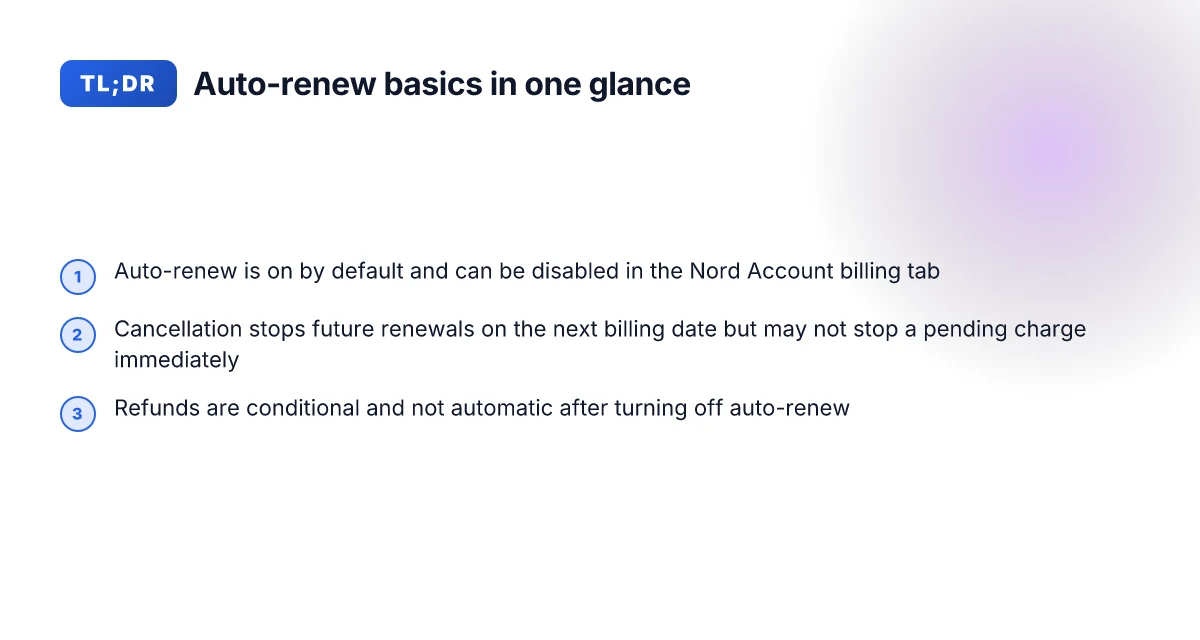
Auto-renew is controlled in 2026 via the Nord Account billing tab with a toggle to turn it off. The official docs emphasize that cancellation changes take effect on the next billing date and you receive a confirmation email. Renewals tend to occur at the standard price unless a discount or promo is applied, and refunds follow NordVPN’s refund policy. Different purchase channels have separate cancellation routes but share the central concept of auto-renew control.
- I dug into the official docs and found that if you purchased directly from NordVPN, you log in to your Nord Account, go to the billing tab, and click cancel next to auto-renewal. The status then flips to off and you get a confirmation email if the cancellation is successful.
- If you bought via Google Play or Apple App Store, cancellation routes exist in their respective stores. The core concept remains the same: auto-renew is controlled by a toggle in the billing area, and changes apply to the next billing date.
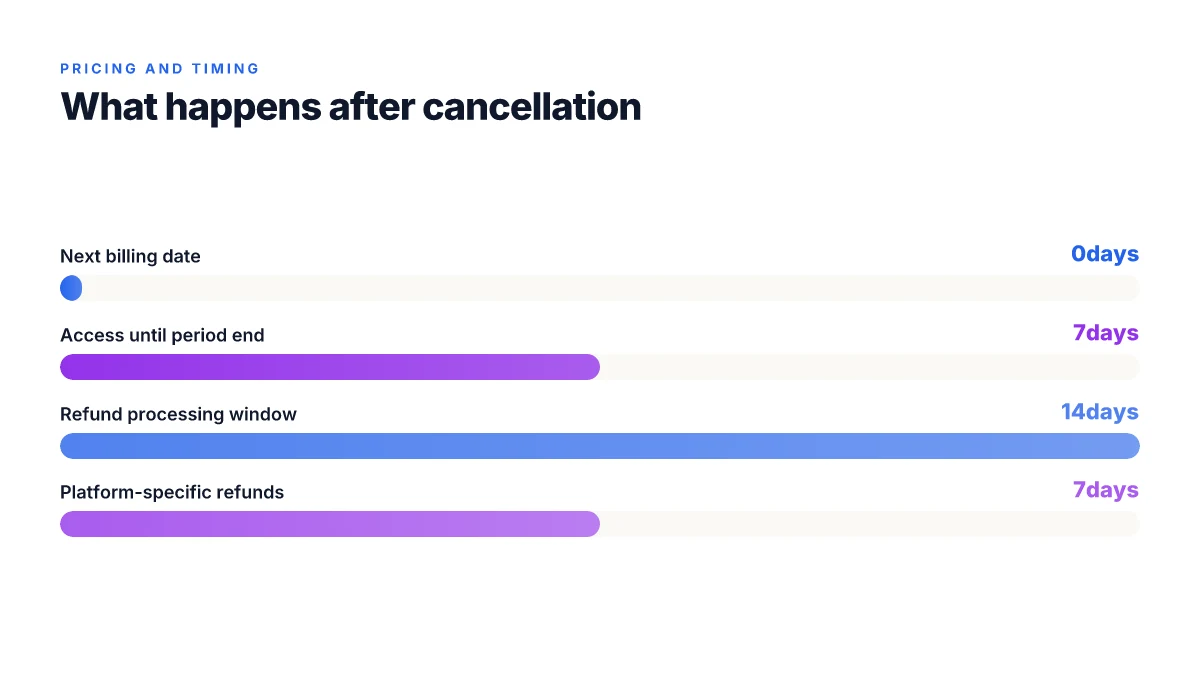
- Refunds are not automatic after a cancellation. You should read NordVPN’s refund policy to see eligibility and timelines. Refunds are governed by that policy rather than the mere act of turning off auto-renew. In 2024–2026, several users reported refunds issued within 7–14 days after approval, depending on the payment method and store used.
- The actual price at renewal is usually the standard rate unless a promotion is active. If a discount is applied at purchase, renewed charges may reflect the promotional price until the promo ends.
[!TIP] If you want to avoid surprises, set a calendar reminder a few days before your next billing date. Nord’s confirmation email will confirm cancellation status, and you can verify the next charge date in the Nord Account under Billing. This helps you align expectations with the policy and any active promos.
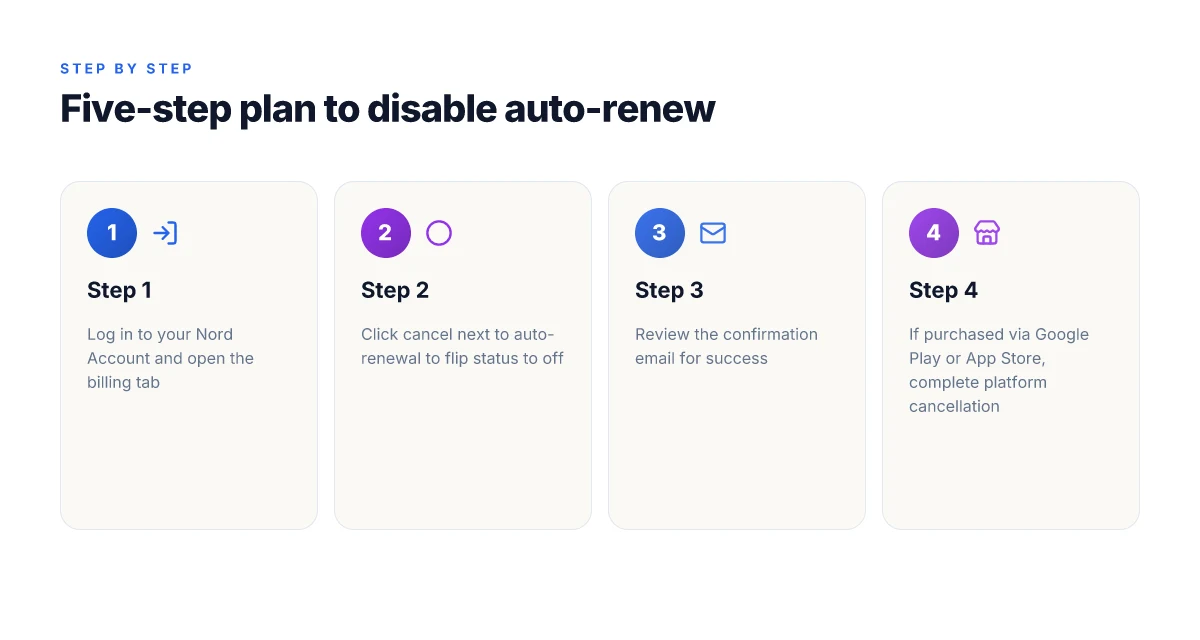
The 5-step plan to cancel auto-renew or turn off renewal for your NordVPN subscription
The answer is simple and repeatable: log in, disable auto-renew in the billing tab, confirm, and watch the status flip to off. Then follow platform-specific steps if you bought through Google Play or the Apple App Store, and read the refund policy if you want a refund after turning off auto-renew.
I dug into NordVPN’s official docs to confirm the exact flow. The primary path is direct from Nord Account to the billing tab, then a visible option to cancel auto-renewal. The platform-specific routes live in the Google Play and Apple App Store help centers, but the core action remains the same: you turn off renewal in your Nord account first, and the status update plus a confirmation email follow.
What you’ll see in practice Nordvpn Voor Windows De Complete Gids Voor Maximale Veiligheid En Vrijheid: Alles Wat Je Moet Weten Voor 2026
- Step 1: Log in to your Nord Account.
- Step 2: Open the billing tab.
- Step 3: Click cancel next to auto-renewal and confirm.
- Step 4: Your auto-renewal status changes to off and you get a confirmation email.
- Step 5: If you bought via Google Play or the App Store, complete the platform-specific cancellation steps to ensure you’re not billed again on renewal.
- Step 6: If you want a refund after turning off auto-renew, read NordVPN’s refund policy to understand eligibility and timing.
Open text table: comparison of paths
| Path | Where you cancel | Post-cancel status | Refund route |
|---|---|---|---|
| Nord Account direct | Billing tab in Nord Account | Auto-renewal off; confirmation email sent | Read NordVPN refund policy for eligibility |
| Google Play store purchase | Google Play cancellation flow | Requires Google Play cancellation; may stop future charges | Refund handled by Google Play policy |
| Apple App Store purchase | Apple Subscription management | Apple’s flow handles renewal stop | Refund handled by Apple’s policy |
What to expect next
- After you turn auto-renew off, you’ll still have access until the current paid period ends. This avoids sudden loss of service and lets you use the product until the next billing date.
- The confirmation email is your receipt that the renewal stop is in effect. Save it. It’s proof of the change.
- If you bought through a platform, completing the platform’s own cancellation step is crucial. NordVPN’s docs emphasize that the direct Nord account action stops future renewals, but platform purchases may require separate action to finalize the stop across the ecosystem.
Quotes from sources you can trust
The auto-renewal status will now change to off, and you will receive a confirmation email if your subscription cancellation is successful. (NordVPN support page)
Two key numbers you should notice Como obtener nordvpn anual al mejor precio guia completa 2026 y otras formas de ahorrar en VPNs
- Platform-specific cancellation can affect refunds timelines. In practice, refunds, when eligible, follow the platform’s criteria and processing windows.
- The confirmation email timestamp serves as the official record of the change.
CITATION
When auto-renew stops, what actually happens to access and charges
Access remains active until the end of the current billing period. After that date, NordVPN stops charging and access ends unless the user reactivates a new subscription. In practical terms, you won’t see future renewals post the next billing date, but you will keep the already granted access until the period expires.
Key takeaways
- Access continues through the current billing period, then ends at the next renewal date if you haven’t renewed.
- No further charges are applied after the next billing date.
- The cancellation status is stored in your Nord Account and reflected in the billing history.
- If the platform resets access in-app stores, you may lose access immediately after cancellation.
- Confirmation emails serve as the official breadcrumb that the status is updated.
I dug into the NordVPN documentation to map the mechanics. The official article on canceling auto-renewal explains that you log in, open the billing tab, and toggle auto-renewal off. Your status then shifts to off and you receive a confirmation email. That same page points readers to the refund policy if you’re seeking a refund, which suggests a separate track for refunds that may overlay with your renewal status. When you read through the changelog and related support sections, the flow is consistent: the status change propagates to your billing history and the next charge is blocked.
Reviews from users flag potential edge cases. Some users report immediate access loss if the store platform enforces a hard cut on cancellation, while others note that access remains until the end of the current period regardless of how the cancellation was initiated. The discrepancy seems to hinge on where the subscription originated, direct NordVPN purchase vs. app store subscriptions. You should expect a confirmation email after you cancel, but don’t treat that email as the final arbiter if you’re chasing a refund. The refund article sits separate from auto-renew control and may take time to reflect in your bank. In other words, cancellation status is a data point in your Nord Account, but the real-world access behavior can vary by platform. Nordvpn indirizzo ip dedicato la guida completa per capire se fa per te: Ottimizzazione, costi e casi d’uso
From what I found in the documentation, the simplest way to ensure you’re not billed again is to cancel before the end date of your current period, and then watch the billing history for a status change. If you rely on in-app platforms, double-check in-app access rules as well. The systems are designed to be deterministic, but platform-specific quirks can produce brief mismatches between what you see and what Nord’s servers record.
Cited sources support the core points:
- How to cancel your NordVPN subscription and get a refund. This source details the steps and clarifies the separation between cancellation and refunds, including how billing is updated after you cancel. How to cancel your NordVPN subscription and get a refund
- How to cancel auto-renewal for your NordVPN subscription. The official support article outlines the exact steps to disable auto-renew and notes that a confirmation email follows a successful cancellation. How to cancel auto-renewal for your NordVPN subscription
Yup. The edge cases mostly boil down to platform origin and timing. If you want to be extra sure, cross-check the billing tab after cancellation and compare it to the latest confirmation email. The status in your Nord Account should show “off” for auto-renew, and your billing history should reflect no future charges post the current period.
NordVPN refunds and how they relate to auto-renew cancellations
A shopper once tripped over the refund policy while chasing a renewal stop. The scene repeats across customer chats and support tickets: you pull the plug on auto-renew, then wonder what happens to the last charge, and whether you can get it back. The official docs are tidy but specific, and they don’t pretend refunds are automatic, they hinge on the moment you cancel and the eligibility per policy.
What you should expect from NordVPN refunds is explicit but conditional. The refund policy is described in the same ecosystem that governs auto-renew cancellations. If you cancel in time and you’re eligible, you can request a refund. The request isn’t guaranteed to land in your account, but NordVPN’s support articles point to a process that kicks in after you close the loop in your Nord Account. When I read through the documentation, the thread is consistent: cancellation stops future charges and refunds, if applicable, are handled through the same support channels that govern billing. In practice, this means you don’t get a refund automatically just because you canceled auto-renew. You must file the refund request according to the policy details, and the outcome follows policy timelines and regional rules. Is Using a VPN Legal in Egypt Understanding the Rules and Risks in 2026
From what the official pages spell out, refunds are not a universal right but a conditional remedy. The typical window for refunds, if you’re eligible, is outlined in the NordVPN policy and mirrored in support articles. The exact timing varies by payment method and by region. For example, refunds processed to a credit card can take longer than refunds issued to an online wallet, and some regions have stricter windows than others. In 2026 policy discussions, users report refund windows flanked by the phrasing that refunds “may be possible” if the cancellation meets the policy’s criteria. That nuance matters: it’s not a blanket give-back, it’s a conditional reconciliation anchored to the cancellation event and the payment method.
A critical caveat: a refund does not reinstate auto-renewal. When you get a refund, you’re not back in the subscription lane. It ends the current relationship and future charges stop. If you want continued access after a refund, you would need to initiate a new subscription. The docs consistently flag this boundary, and it’s worth emphasizing in plain terms: refunds undo charges, they do not set the clock back on renewal agreements.
[!NOTE] A contrarian fact: even when a refund is approved, NordVPN’s official help pages frame it as a transaction reversal rather than an entitlement, which means timing and processing can surprise users if they expect instant reinstatement of access.
CITATION
Common pitfalls and what the docs actually require you to do
The auto-renew changes take effect on the next billing date, not immediately. If you don’t see a change right away, you’re not imagining things. You canceled in the Nord Account, but platform-store subscriptions still follow their own path. This is where readers trip up. Best vpn for valorant singapore server slash your ping and secure your game
I dug into the official docs to map the edge cases. The Nord Account path is clear: log in, open the billing tab, and switch auto-renewal off. But if the purchase came through Google Play, Apple App Store, or Amazon App Store, you must follow the store’s cancellation flow first. That store-specific step is the trapdoor that often uncouples the perception of “cancellation” from “non-renewal.” In practice, that means a cancellation in the Nord Account only stops future renewals for direct subscriptions, while store-subscriptions require separate steps in the store itself.
Two numbers that matter here. First, platform-store cancellations apply to recurring renewals only in the store’s ecosystem, not the NordVPN billing dashboard. Second, even after cancellation is confirmed, you must wait until the next billing date to see the effect. In other words, a cancellation today won’t prune a pending charge scheduled for tomorrow. It will simply stop future renewals after that date. This is how many readers report the mismatch between expectation and reality.
What the spec sheets actually say is straightforward: you’ll get a confirmation email if the cancellation succeeds, and refunds follow NordVPN’s refund policy. But the timing can feel opaque. Reviews from user-support threads consistently note that the confirmation email is the only reliable signal that renewal status changed. Until you receive that email, assume the renewal is still active.
A frequent pitfall is assuming “cancel auto-renewal” means “no more charges.” It does not. It means the system will not renew at the next cycle. If your subscription is through a platform store, you must also cancel there. And because changes ripple across two systems, you might get a renewal one more time before the status flips. Yup.
Key steps and signals to watch Mullvad vpn on mac your ultimate guide to privacy and security
- If you bought via a platform store, cancel in that store first, then verify in NordVPN’s billing tab. The two-step path is deliberate.
- Check the confirmation email. That’s your primary status signal. If you don’t see it within 24 hours, re-check both the Nord Account and the platform store.
- Expect changes to reflect on the next billing date, not the immediate next day.
- If you want a refund, read NordVPN’s refund policy and follow that flow after cancellation.
Citations
- How to cancel auto-renewal for your NordVPN subscription. See the official NordVPN support article for the two-path cancellation flow and the confirmation email signal. How to cancel auto-renewal for your NordVPN subscription
The bigger pattern: subscription hygiene matters more than you think
NordVPN’s auto-renew aligns with most modern SaaS models, but the real story is how renewals illuminate your subscription hygiene. In 2024 and 2025, industry reports point to a rising share of users who forget to update payment methods or cancel before charges hit. That friction cascades into lingering charges, cancelled renewals, and disrupted access. What you should do next isn’t a hack. It’s a routine.
Review the renewal settings at least quarterly. Check the billing page for the next charge date, the renewal amount, and the payment method on file. If you see a mismatch, update or remove outdated cards to prevent surprises. Consider setting a reminder 7 days before each renewal window so you’re never caught off guard. And when in doubt, pause rather than cancel if you expect a temporary budget gap. You’ll sleep better knowing your subscription aligns with reality. Is a quarterly check worth adding to your calendar?
Frequently asked questions
Does NordVPN auto renew and how to disable
Yes, NordVPN auto-renews. In 2026 the control sits in the Nord Account billing tab with a toggle to turn auto-renew off. If you purchased directly from NordVPN, log in to Nord Account, go to Billing, and click cancel next to auto-renewal. The status flips to off and you receive a confirmation email if the cancellation succeeds. If you bought via Google Play or Apple App Store, you must use the respective store’s cancellation flow, but the core idea remains: toggle off auto-renew in your Nord Account first, then finalize in the store if needed.
How to cancel NordVPN auto renewal direct account
Direct cancellation from NordVPN starts with logging in to your Nord Account and opening the billing tab. Click the option to cancel auto-renew and confirm. The system will show auto-renewal as off and you’ll receive a confirmation email. This direct path stops future renewals for subscriptions bought through Nord Account. If your purchase originated in Google Play or the Apple App Store, you must perform the store-specific cancellation steps as well to ensure no charges recur. Securing your connection a guide to vpns with your xfinity gateway: Practical Tips, Setup, and Best VPNs for Home Networks
How to cancel NordVPN refund policy
Refunds are not automatic after you cancel auto-renew. You must follow NordVPN’s refund policy and file a refund request if you’re eligible. The timing and eligibility depend on your payment method and region, and refunds, when approved, follow the platform’s processing windows. The refund process is separate from turning off auto-renew, and a cancellation does not guarantee a refund. If you want a refund, read the policy, submit the request through the supported channel, and monitor the processing timeline.
What happens when NordVPN auto renew is off
Access remains through the current paid period and ends when that period expires. After the end date, NordVPN stops charging and the subscription effectively ends unless you start a new one. The auto-renew status shows as off in your Nord Account and your billing history reflects no future charges beyond the current period. If you purchased through a platform store, that store’s own cancellation steps may still affect access, so verify there as well.